MarketMare Pro features

Find, filter and track racing value.

MarketMare Pro gives you the tools to spot bookmaker prices that stand out against the exchange, control the alerts you receive, and review how your setups perform over time.

Pro workflow Included in Pro
๐Ÿ”Ž

Scan

Compare bookmaker prices against the exchange guide.

โš™๏ธ

Filter

Choose the races, prices and terms you want to see.

๐Ÿ“ฒ

Alert

Get qualifiers delivered straight into Telegram.

๐Ÿ“Š

Review

Track results, CV, CLV, exports and setup performance.

Preset systems 3 custom feeds Backtesting P/L tracking
Built around one job

Make the racing market easier to act on.

MarketMare is not just a list of selections. It is a scanner, filter system and tracking toolkit that helps you understand why an alert appeared and whether a setup is worth following.

01
๐Ÿ”Ž

Spot standout prices

The scanner looks for bookmaker odds that are bigger than the exchange guide, then keeps the key race information with the alert.

02
โš™๏ธ

Control the noise

Use presets for a simple start, or build custom feeds around your own odds, race, place term and value filters.

03
๐Ÿ“ˆ

Review what works

Use tracking, CV, CLV, results views and exports to understand whether a feed is finding prices that hold up.

Feature set

Everything included in MarketMare Pro.

From the first scan to the final review, each tool helps you find better prices, control the alerts and understand what is working.

Core tools
๐Ÿ’Ž

Value scanner

Compares bookmaker prices against the exchange guide and flags runners where the available odds look bigger than the market suggests.

๐Ÿ

Profitable preset systems

Start with ready-made systems that have proven tracked results, giving new users a simple way to follow alerts without building filters from scratch.

๐Ÿ“ฒ

Telegram alerts

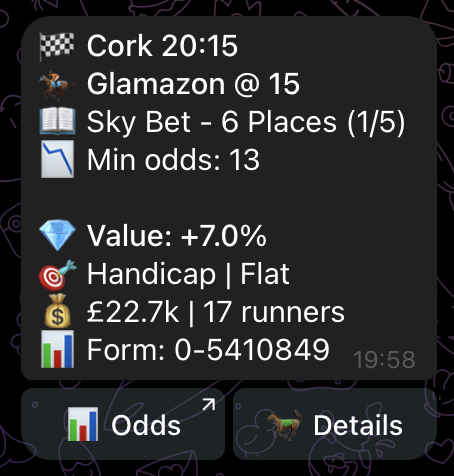
Qualifiers are sent straight to Telegram with the race, runner, bookmaker, odds, minimum odds, value figure and race context.

๐Ÿงฉ

Custom Pro feeds

Create your own feeds around the race types, prices and setups you want to follow, so you are not limited to one shared alert stream.

โš™๏ธ

Smart filters

Filter alerts by odds, value level, race type, number of runners, favourite price, bookmaker and place terms.

Odds Value Race type Runners Places
๐Ÿงช

Backtesting

Test filters against previous scan data before deciding whether a setup is worth following live.

๐Ÿ“Š

P/L tracking

See how alerts perform over time, including win and each-way style tracking, so you are not relying on memory or screenshots.

๐Ÿ“‰

CV and CLV checks

Review whether alerts beat the later market and the industry starting price, which helps show if prices are holding up after they are sent.

๐Ÿ“–

BOG and Rule 4 views

Track results with views that better reflect real racing returns where Best Odds Guaranteed or Rule 4 changes may matter.

๐ŸŒ…

Morning and evening summaries

Get compact roundups so you can see the day ahead and review what happened without digging through every alert.

๐Ÿ“ค

Excel exports

Export alert data for your own analysis, record keeping, filtering or spreadsheet review.

๐Ÿ™‹

Support and onboarding

Use the start guide and support links to get set up quickly, understand the bots and choose a sensible starting point.

Ways to use it

Start simple, then go deeper when ready.

Different users can use the same tool in different ways. The aim is to make the first step easy while leaving room for more control.

Beginner

Follow proven preset systems

Use the profitable tracked systems first while you learn what the alerts mean.

  • No setup needed
  • Tracked results
  • Simple starting point
Builder

Create your own feeds

Build alert streams around the markets, races and value levels you prefer.

  • Choose your filters
  • Focus on specific race types
  • Test ideas with backtesting
Reviewer

Track and refine

Use performance tools to understand what is working and what needs tightening.

  • Review P/L over time
  • Check CV and CLV
  • Export data for deeper analysis
What you get

A complete racing alert setup.

MarketMare Pro is built so the key parts work together, from the alert feed through to the review tools.

Alert access

The Telegram setup gives you a quick way to receive and separate different alert streams.

โœ“Profitable preset systems bot
โœ“3 custom Pro feed bots
โœ“Free channel access
โœ“Start guide and support

Analysis tools

The review layer helps you move beyond one-off results and judge setups with more context.

โœ“Backtesting tools
โœ“P/L tracking
โœ“CV and CLV views
โœ“Excel exports

Use proven presets, or build your own setup.

Use MarketMare Pro to find standout racing prices, send them to Telegram, and review the data behind the alerts.